Connect Odoo and ShipStation with more than a basic integration. Connex gives you the flexibility to automate complex order routing, conditional field mappings, shipping rules, and fulfillment workflows using a powerful no-code Rules Engine. Build, test, and adjust your workflows in minutes—without costly custom development or ongoing code maintenance.
Everything you need to connect Odoo with your ecommerce, accounting, shipping, and fulfillment systems.
Connect Odoo to Your Ecommerce Stack
Connect Odoo with ecommerce, shipping, and accounting systems to keep orders, fulfillment, inventory, and business data moving automatically.
Automate Complex Odoo Workflows
Build custom routing, mappings, and business rules for workflows that basic Odoo connectors can’t support—without relying on custom code.
Keep Your Data in Sync
Keep Odoo and your connected systems aligned by automatically syncing the data your teams rely on, reducing manual entry, errors, and reconciliation work.
Complex Order Workflow
How a Growing Ecommerce Business Automated a Complex Workflow and Saved 20+ Hours Per Week
A growing online retailer specializing in discounted apparel helps customers access high-quality products at more affordable prices by sourcing overstock, samples, and clearance inventory.
How a Growing Ecommerce Business Automated Complex Workflows
As the business grew, managing ecommerce operations across disconnected systems became increasingly time-consuming. The team spent hours each week manually managing orders, updating inventory, reconciling transactions, and handling product data. With Connex, they automated these complex workflows, reducing manual work, improving accuracy, and creating a more scalable operation that could keep up with continued growth.
What Data Does Connex Sync Between Odoo and ShipStation?
Connex moves data in both directions, keeping your storefront and your books aligned without manual intervention.
Data Type
SYNC DIRECTION
Frequency
Products
Two Way
Real Time
Orders
Two Way
Real Time
Customers
Two-Way
Real Time
Refunds
ShipStation
Odoo
Scheduled
Fulfillment
Two Way
Scheduled
Taxes
Two Way
Scheduled
Troubleshooting Odoo and ShipStation Sync Issues
Duplicate customers, mismatched products, and invoices that do not reflect closed deal terms can create costly manual cleanup.
Connex prevents these issues with configurable field mapping, duplicate controls, and clear sync-error details, so your sales and accounting data stays aligned.
Advanced Order Routing for Odoo & ShipStation
Not every order should follow the same fulfillment path. Connex uses conditional rules to route orders between Odoo and ShipStation based on customer, shipping method, warehouse, or other order data. Complex B2B requirements happen automatically—without hard-coded logic or manual intervention.
FREQUENTLY ASKED QUESTION
Does it work with Odoo Online?
Because budget plugins install directly inside your Odoo environment, a bug in the plugin code can slow down or crash your everyday site functionality. Connex operates as an external cloud-based integration engine. Because it runs via cloud APIs rather than installed website code, it processes data safely without ever putting your day-to-day Odoo system stability or store performance at risk.
FREQUENTLY ASKED QUESTION
Does it require a software developer to set up the integration?
No, business users can pair Odoo and ShipStation. There are no files to install on the website.
Order Routing Across Warehouses and 3PLs
Complex fulfillment breaks down when a basic connector expects every order to follow the same path. Connex is built for multi-channel operations, routing orders from Odoo and your selling channels into ShipStation while supporting the custom rules and non-standard workflows that simple one-to-one plugins can’t handle. Manage multiple warehouses, 3PLs, B2B orders, and other fulfillment exceptions through one cloud-based integration—without maintaining a patchwork of plugins or custom code.
Migrate Without Breaking Your Workflow
Switching fulfillment systems shouldn’t force you to rebuild your entire integration. Connex helps bridge the transition by keeping orders, shipment data, and tracking flowing between Odoo, ShipStation, and your other systems as your fulfillment stack changes. Instead of replacing one rigid connector with another, you can adapt your mappings and business rules to the new workflow—without disrupting the rest of your operation.
FREQUENTLY ASKED QUESTION
Can a business user adjust workflows without a programmer?
Yes, using our rules engine, you can create custom workflows.
FREQUENTLY ASKED QUESTION
If Odoo is upgraded, does your integration need an update?
No, no changes are necessary on your side. If an upgrade is required, we will perform changes on our end.
Complex Orders Without Custom Code
B2B orders rarely fit a basic one-size-fits-all workflow. Connex uses a no-code Rules Engine to handle custom fields, conditional mappings, kits, and other non-standard Odoo workflows while keeping orders and shipment data moving between Odoo and ShipStation.
Two-Way Odoo & ShipStation Sync
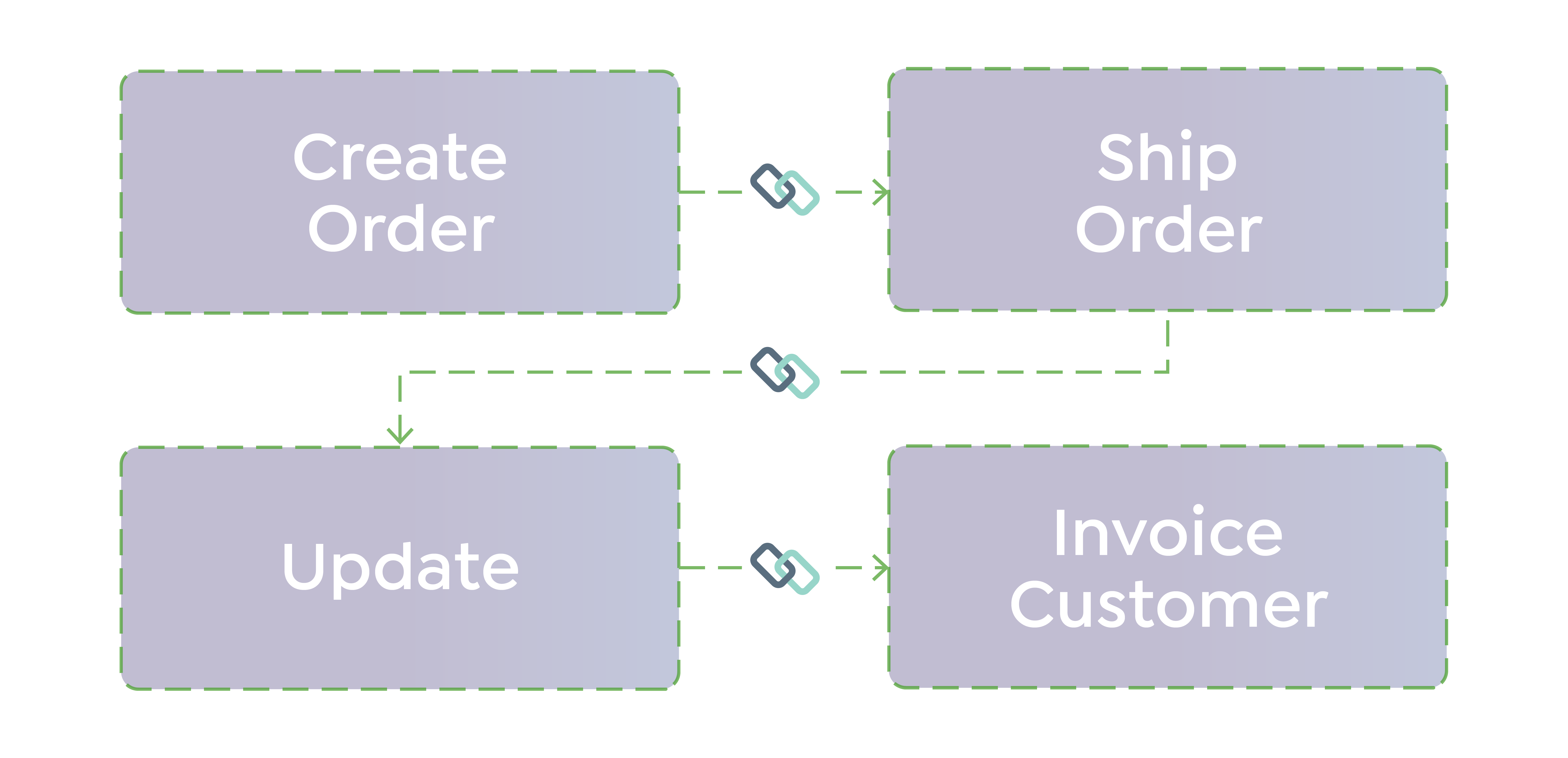
Connex sends sales orders from Odoo to ShipStation for fulfillment, then updates Odoo with shipment validation and tracking once labels are created. Unlike basic one-way connectors, the workflow stays in sync in both directions without custom developer scripts.
FREQUENTLY ASKED QUESTION
What kind of support and onboarding do you offer?
We offer a 3 hour onboarding package to assist with pairing, set up and testing. We provide on going phone and email support. Most tickets are responded within a 4 - 6 hour timeframe during business hours.
Proof
Order workflow automation
Fine Lines avoided an ERP migration and saved roughly $60,000 by staying on their existing stack with Connex.
Order workflow automation
Kaley Scott's team saved close to 40 hours a week migrating from ShipStation to ShipHero with Connex handling the sync.
Order workflow automation
Loaded Boards saves more than 100 hours a month on fulfillment related accounting work.
ROI
Calculate the hours your team is losing to manual fulfillment fixes.
When your Odoo and ShipStation workflow requires custom routing, field mappings, or non-standard business rules, basic connectors quickly fall short. Connex gives you a flexible, cloud-based Rules Engine to build and adjust those workflows without custom code, installed plugins, or ongoing developer maintenance.
How DeepDrip Eliminated Manual Order Processing and Saved 30+ Hours Per Week
DeepDrip scaled to 7+ sales channels—but their systems couldn’t keep up. Connex eliminated manual order processing and connected QuickBooks with ShipHero into one seamless workflow.
How Bridal Outlet Automated a Complex WooCommerce + QuickBooks Workflow and Saved 20+ Hours Per Week
The Bridal Outlet is an online retailer specializing in discounted wedding dresses and bridal apparel. By sourcing overstock, samples, and clearance inventory, they provide brides access to high-quality designer gowns at a fraction of traditional retail pricing.
How SS Tubes Automated Order Sync and Inventory Workflows to Eliminate Errors and Scale Operations
As SS Tubes scaled to over 10,000 SKUs, disconnected systems created delays, errors, and manual work. Connex automated their workflows across Shopify, ShipStation, and QuickBooks—turning a fragmented process into a scalable operation.
Odoo Native Connector vs. Third-Party Integration: What's the Difference?
Basic Connector
Feature
Basic Connector
Custom Development
Connex
Installation
Installation
Installed inside Odoo environment
Custom code in Odoo or middleware
Cloud-based, no Odoo code changes
Built for complex, multi-system workflows
Workflow Complexity
Built for simple A → B syncing
Built for complex, multi-system workflows
Built for complex, multi-system workflows
Rigid field mappings
Conditional Field Mapping
Rigid field mappings
Custom coding required
Conditional rules & custom field mapping
No onboarding
Onboarding
No onboarding
Requires developer scoping
Workflow assessment, configuration, testing, and launch support
Ongoing maintenance
Ongoing maintenance
Manual plugin updates
Ongoing developer cost
Managed by Connex
For businesses with standard order flows, a native connector may be sufficient. For mid-market and B2B operations with customer-specific rules, multi-warehouse routing, or partial shipments, a managed integration like Connex eliminates the ongoing cost and fragility of maintaining custom code inside Odoo.
Frequently Asked Questions
Does it work with Odoo Online?
Yes. Connex works with Odoo Online and connects to Odoo and ShipStation through their APIs, so there is no Connex software to install inside your Odoo environment.
Does it require a software developer to set up the integration?
No, business users can pair Odoo and ShipStation. There are no files to install on the website.
If Odoo is upgraded, does your integration need an update?
No, no changes are necessary on your side. If an upgrade is required, we will perform changes on our end.
What kind of support and onboarding do you offer?
Connex includes a 3-hour guided onboarding package where an integration specialist helps you pair Odoo and ShipStation, configure your field mappings and routing rules, and test your workflow before go-live. Ongoing phone and email support is included, with most tickets responded to within 4 to 6 business hours. Unlike self-service connectors, you are not left to configure the integration alone.
Can a business user adjust workflows without a programmer?
Yes. Business users can create, test, and update workflows in the Connex Rules Engine without writing any code or involving a developer. You define conditions (such as customer name, shipping method, or order value), set the action (such as mapping a field or routing to a warehouse), and validate the result instantly using the Order Previewer before the rule goes live.
Which integration tools connect Odoo with ShipStation for shipping automation?
Connex Ecommerce is a cloud-based integration platform that connects Odoo and ShipStation without requiring any code changes to your Odoo environment. It syncs sales orders from Odoo to ShipStation, applies conditional routing and field mapping rules, and writes tracking numbers and shipment confirmations back to Odoo automatically after labels are created in ShipStation.
How does Connex map Odoo sales orders to ShipStation shipments?
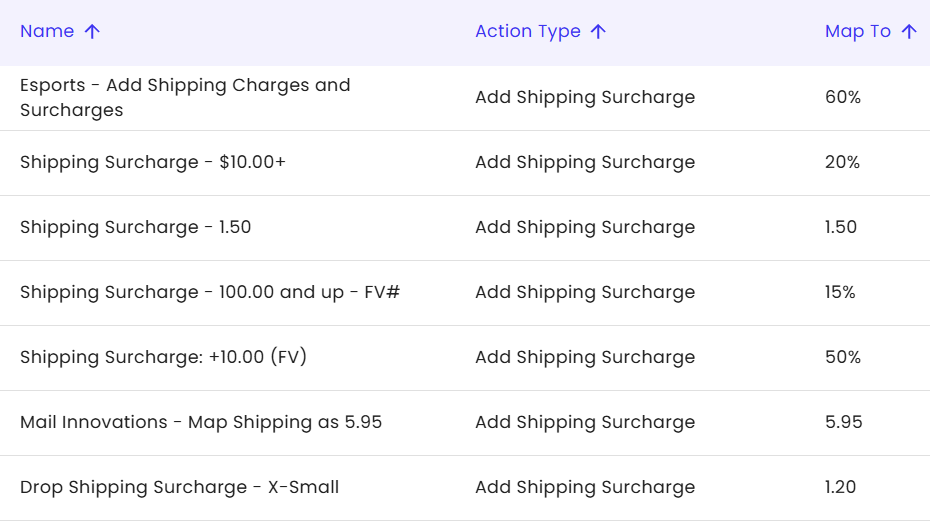
Connex pulls confirmed sales orders from Odoo and pushes them to ShipStation using a field mapping that includes order number, billing and shipping address, SKU, item name, quantity, order date, and unit price. Custom mappings — such as shipping cost overrides, customer-specific fields, or warehouse routing — are configured in the Rules Engine without code. When ShipStation creates a label, Connex matches it back to the originating Odoo order by order number and writes the carrier, tracking number, and ship date back to Odoo.
Why are some Odoo orders not appearing in ShipStation?
The most common causes are an order status filter (Connex only syncs orders in a specific Odoo status; draft or cancelled orders are excluded), an expired or changed Odoo API credential, or an order created before the integration's sync start date. You can diagnose the issue using the Connex sync log, which shows which orders were evaluated, which were skipped, and why.
Why is tracking information not updating in Odoo after ShipStation ships an order?
Connex checks ShipStation for new shipping labels every 30 minutes. If a tracking number has not appeared in Odoo, the most likely cause is that the ShipStation label was not yet created at the time of the last sync, or the Odoo order was manually marked as fulfilled before Connex could write the tracking back. Check the Connex sync log to confirm whether the write-back was attempted and whether an error was returned.
How is Connex different from a native Odoo ShipStation connector or a budget plugin?
Native Odoo connectors and budget plugins install directly inside your Odoo environment, which means a plugin bug can affect your Odoo site's performance or break on a version upgrade. Connex operates as an external cloud-based engine that communicates with Odoo and ShipStation via API — your Odoo installation is never modified. It also includes a no-code Rules Engine for conditional mappings and routing, guided onboarding, and managed upgrades, which self-service plugins do not provider.
Is Connex the right fit for a mid-market or B2B wholesale business?
Yes. Connex is designed for mid-market ecommerce and wholesale businesses that have outgrown basic connectors. It is the right choice when orders include customer-specific shipping rules, multiple warehouses or 3PLs, partial shipments, backorder management, or B2B invoicing logic that a standard one-to-one connector cannot handle. Businesses with straightforward, high-volume B2C orders and no custom requirements may find a simpler tool sufficient.
How does Connex keep Odoo inventory accurate when ShipStation handles fulfillment?
Connex writes shipment confirmation and tracking data back to the originating Odoo order after ShipStation creates a label. This triggers Odoo's native inventory deduction on the fulfilled order lines. If orders are manually marked as fulfilled inside ShipStation without going through the Connex sync, the write-back does not occur and Odoo inventory will not update. For partial shipments, Connex writes back only the lines that have shipped, leaving open lines in Odoo for backorder processing.
Does Odoo sync inventory to Shopify in real time?
Yes. Connex provides a real-time webhooks-based synchronization for inventory. Whenever a stock level changes in Odoo (due to a purchase order, return, or warehouse adjustment), the updated count is pushed to Shopify instantly.
How can I map Odoo sales orders to ShipStation shipments automatically
Yes. Connex provides a real-time webhooks-based synchronization for inventory. Whenever a stock level changes in Odoo (due to a purchase order, return, or warehouse adjustment), the updated count is pushed to Shopify instantly.
.svg "Connex Ecommerce Logo-white (1)")
.png?width=2048&height=248&name=Untitled%20design%20(12).png)

-1.jpg?width=1000&height=1000&name=Untitled%20design%20(1)-1.jpg)
-1.png?width=218&height=81&name=Untitled%20design%20(3)-1.png)
-2.png?width=218&height=25&name=Untitled%20design%20(4)-2.png)


.jpg)
-1.png)